“Monofilament quality” usually means you’re trying to control four outcomes at the same time:
Dimensional stability: diameter variation and ovality (out-of-round)
Surface quality: smoothness, low gels/specks, consistent appearance
Mechanical performance: tensile strength and elongation
Downstream behavior: stable unwinding and predictable shrinkage
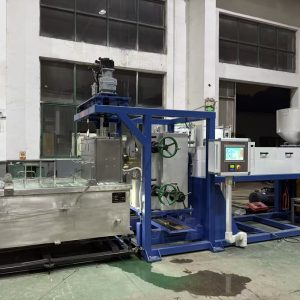
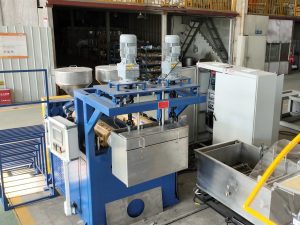
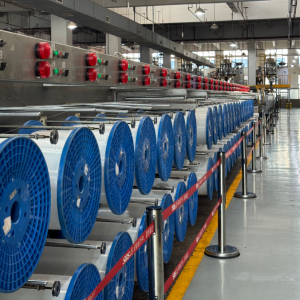
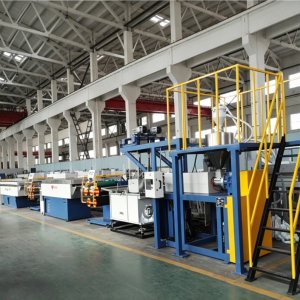
Because the line is a chain (material handling → melt → die → quench → drawing → heat-setting → winding → measurement), a small instability upstream often shows up later as “random” scrap.
If you’re troubleshooting, don’t treat plastic monofilament quality as one problem. Treat it as monofilament extrusion troubleshooting: symptom first, then upstream checks.
Pro Tip: Start from the symptom (diameter drift vs. ovality vs. specks vs. bubbles vs. breaks), then work backward to the stage that can physically create it.
1) Resin consistency (polymer grade, lot variation, and contamination risk)
What it affects most: plastic monofilament quality—diameter stability, surface defects, and property consistency.
If resin grade, IV/MFI, or recycled content changes, melt viscosity changes. That moves your “stable window” for diameter control and drawing.
Common symptoms
Unexplained monofilament diameter variation across lots
Random weak spots or breakage during drawing
More gels/specks when regrind/recycled feed increases
First checks
Lot mixing, regrind ratio control, conveying cleanliness
Whether any “small” material change was made without re-qualifying settings
2) Drying and moisture control (especially nylon and PET)
What it affects most: bubbles/voids, surface defects, viscosity stability, and downstream strength.
For hygroscopic polymers (notably many nylons and PET), moisture can create bubbles/voids and destabilize the melt.
Common symptoms
Bubbles/voids; splay-like surface defects
Diameter drift that correlates with hopper refills, weather, or regrind
First checks
Dryer capacity vs throughput, real residence time, dew point control
Material exposure between dryer and hopper; regrind drying discipline
3) Melt filtration and screen-change discipline
What it affects most: surface finish, specks/gels, and breakage risk.
Small contamination prints onto the surface or becomes a stress concentrator.
Common symptoms
Specks, gels, streaks, or rough surface
Gradual quality decline as run-hours increase
First checks
Screen pack/melt filter suitability for resin and impurity level
Pressure trend drift that indicates filter loading
4) Melt stability (temperature profile, pressure pulsation, and output consistency)
What it affects most: diameter stability and surface consistency.
Surging output shows up as periodic thick–thin diameter patterns and unstable laser trends.
Common symptoms
Diameter cycles; “waving” on laser diameter monitoring
First checks
Temperature stability under load (barrel + die), feed stability, melt pressure trend
5) Die condition and melt-flow symmetry (wear, alignment, and cleanliness)
What it affects most: ovality, surface lines, and stable formation before quench.
A filament can hit nominal diameter in one direction but still fail ovality because of asymmetric flow or misalignment.
Common symptoms
Persistent ovality or one-sided surface lines
First checks
Die cleanliness/deposits; die-to-quench-to-guides alignment
Two-axis measurement (diameter + ovality), not single-axis checks
For a buyer/evaluation view (including why ovality matters), see NLY’s guide on how to choose the right plastic monofilament extrusion machine for your production line.
6) Quench water bath temperature monofilament control (and flow symmetry)
What it affects most: ovality, diameter stability, internal stress, and surface appearance.
Most monofilament ovality control work is really quench symmetry + alignment.
Common symptoms
Ovality changes with water temperature/flow
Diameter drift that tracks cooling water instability
First checks
Bath temperature stability (including uniformity by location)
Flow pattern/turbulence; consistent strand entry and die-to-water interface distance
7) Draw ratio control (setting strength vs. elongation)
What it affects most: tensile strength and elongation—and indirectly diameter if draw is unstable.
Your draw ratio monofilament window is where you get stable strength/elongation without necking or breaks.
A general melt-spinning overview explains how drawing and quenching conditions influence orientation and stability (see melt-spun fibers and drawing behavior). The mechanism applies to monofilament too: draw conditions change orientation and properties.
Common symptoms
Low strength/high elongation: under-draw or too-hot draw conditions
High strength/low elongation + breaks: over-draw or too-cold draw conditions
First checks
Real speeds per stage (actual ratio, not only recipe)
Draw-zone temperature uniformity
8) Draw speed synchronization and tension control (between stages)
What it affects most: diameter variation, property scatter, and break frequency.
If stage speeds don’t synchronize, tension swings create inconsistent stretching—then inconsistent diameter and properties.
Common symptoms
Periodic diameter variation; higher-speed break spikes
First checks
Slip/traction issues, dancer/load cell oscillation, speed stability on godets/pullers
9) Heat-setting / annealing (shrinkage control and stress relief)
What it affects most: dimensional stability after winding, shrinkage behavior, and “memory.”
Heat-setting stabilizes the filament after drawing. If it’s off-window, problems show up after winding or during downstream use.
Common symptoms
Coil instability on the spool; post-wind shrinkage; storage brittleness
First checks
Temperature profile uniformity, residence time at actual speed, cooling conditions
10) Winding and handling (package build, traverse, and take-up tension)
What it affects most: surface damage, deformation, and downstream unwinding behavior.
It’s common to make good filament and damage it at take-up.
Common symptoms
Flattening/ovality near the spool; scuffs; poor unwinding
First checks
Tension stability during ramps; traverse pattern; guide friction/sharp edges
Quick troubleshooting table (start here)
What you see | Most likely upstream drivers | First checks (fastest) |
|---|---|---|
Diameter drift | melt instability, moisture, quench instability, tension swings | melt pressure trend, dryer status, quench temp stability, draw speed sync |
Ovality / out-of-round | uneven quench, misalignment, asymmetric flow, tension disturbances | quench symmetry, die→bath alignment, two-axis measurement |
Specks / gels / streaks | contamination, filtration issues, die deposits, degradation | screen pack condition, hopper cleanliness, die inspection |
Bubbles / voids | drying/moisture control | dryer performance, resin exposure, regrind drying |
Breaks in drawing | over/under-draw, wrong draw temp, weak spots from contamination/moisture | draw window, tension stability, filtration discipline |
If you want a process map to align the symptom to the exact stage, NLY’s overview of how a monofilament extrusion line works for brush bristle filament is a useful reference.
Next steps to improve plastic monofilament quality (without guesswork)
A practical next move is to document:
polymer(s), target diameter range, and application (zipper/brush/net/rope)
defect pattern (drift, ovality, specks, bubbles, breaks)
current control stack (drying, filtration, quench control, draw stages, tension measurement, laser diameter monitoring)
NLY (Changzhou New Liaoyuan Machinery) can help translate that into a line configuration and commissioning plan—request a configuration review plus a run sample/FAT plan so you can validate stability before you commit.